How We Use Comper To Improve Comper
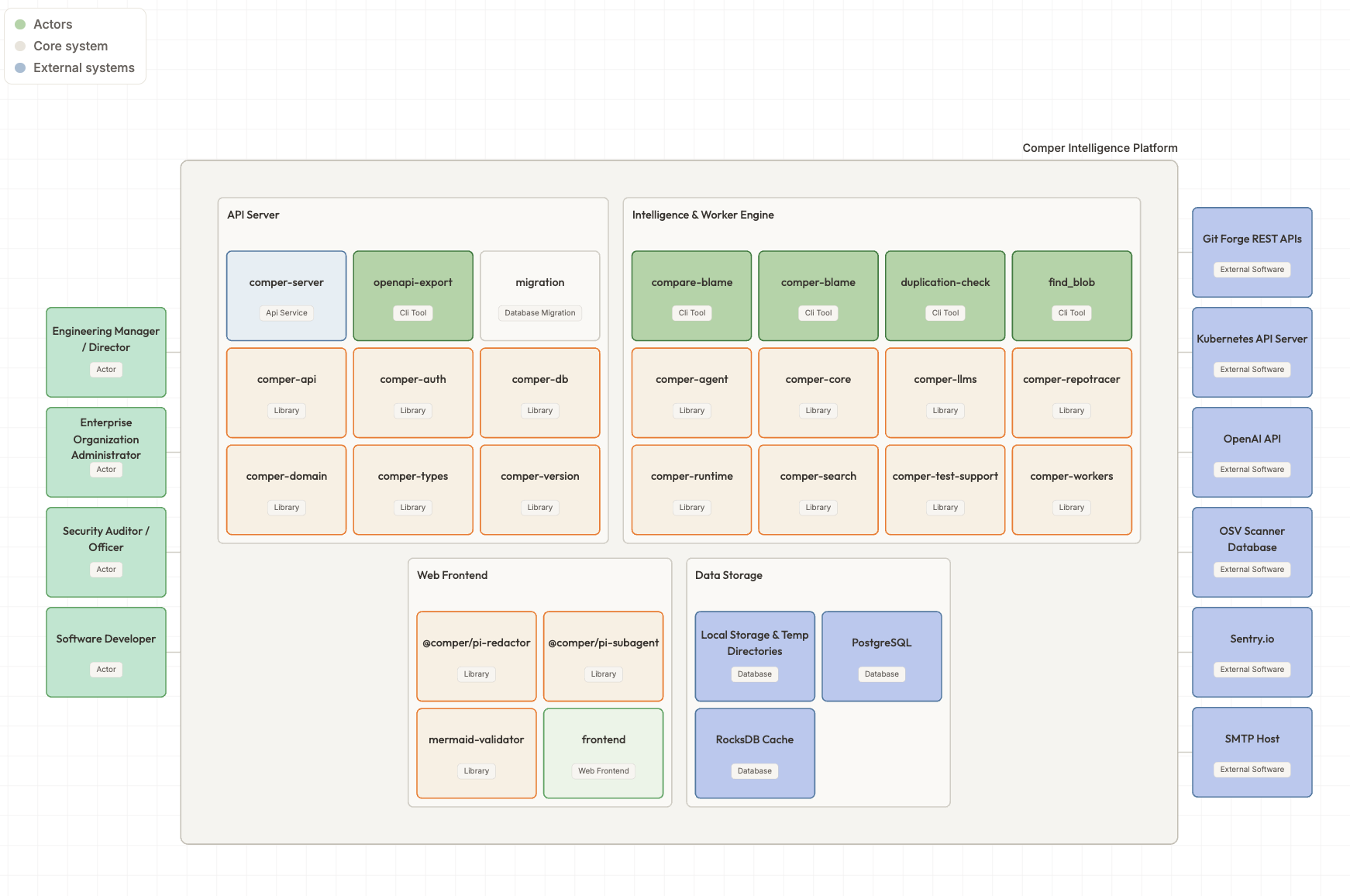
Analysing and fixing AI-generated code bloat became a new engineering skill nobody asked for. While crunching through our own product’s 400k+ of lines of code, we created some helpers.
My first day at Comper felt like stepping out of a space rocket. With every team member hooked up with their GitLab account and AI agent of choice, I encountered a new world where everybody codes.
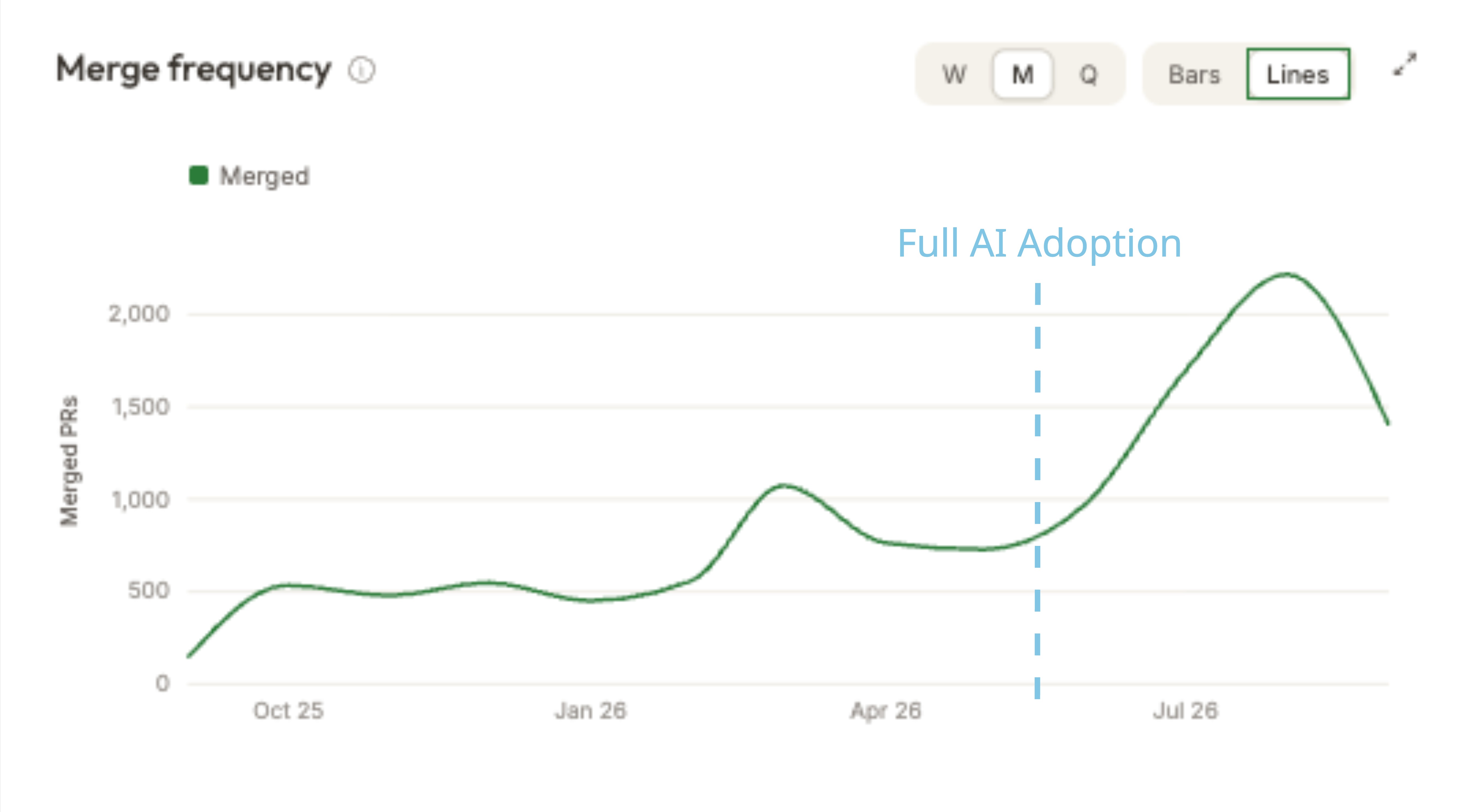
“Design”, “Product”, “Marketing”, “Engineering” and “Sales” transcended from carrying the meaning of a job title to the way you type your prompt in your coding agent interface. But the upside of cutting out Engineering involvement to move faster came with a cost. We were facing a massive, cross-disciplinary, shared output we all needed to deal with: Code, code and, even more code.
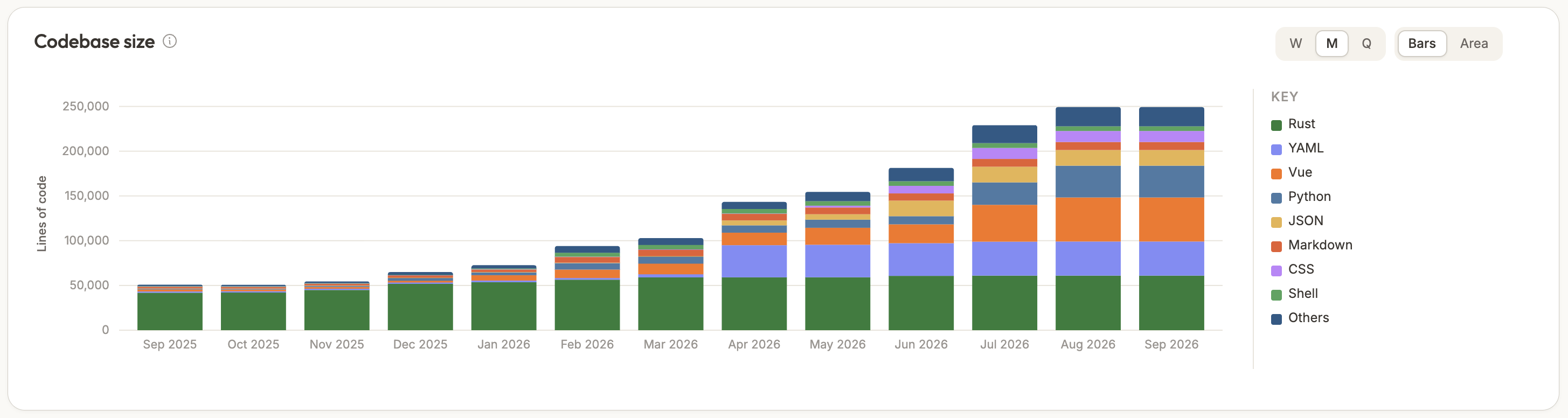
The mountains of code weren’t only piled up by non-Engineering team members, they were also generated by the Engineering team. Comper, which started as a bootstrapped project by Jouke, was largely built through AI-assisted coding and carried several historical layers of agent abilities within. When I looked at our front-end codebase on my first day, it seemed like a large, incomprehensible mess: God components, inconsistencies across naming and structural patterns plus bloated CSS wherever you looked. In order to scale for enterprise customers and enter the next chapter of our product, we needed to do some spring cleaning.
When your code is read by AI agents alongside fellow Engineers, you are facing a new discipline: AX (Agent Experience). A cleanly structured front-end codebase is mutually improving both AX and DX (Developer Experience), as established patterns will get emulated. It also makes your agent usage more efficient, as your LLM requires less round-trips trying to make sense of something that didn’t make sense in the first place.
5 months later I can proudly say that we made the best out of our own experiences prepping for scale: We turned them into features available at Comper.
Analysing AI-generated Code
At Comper we believe that you can’t fix what you can’t see. So I first started my process with analysing the status quo of our front-end codebase and bringing visibility to the issues I noted.
A rainbow of Hex Codes
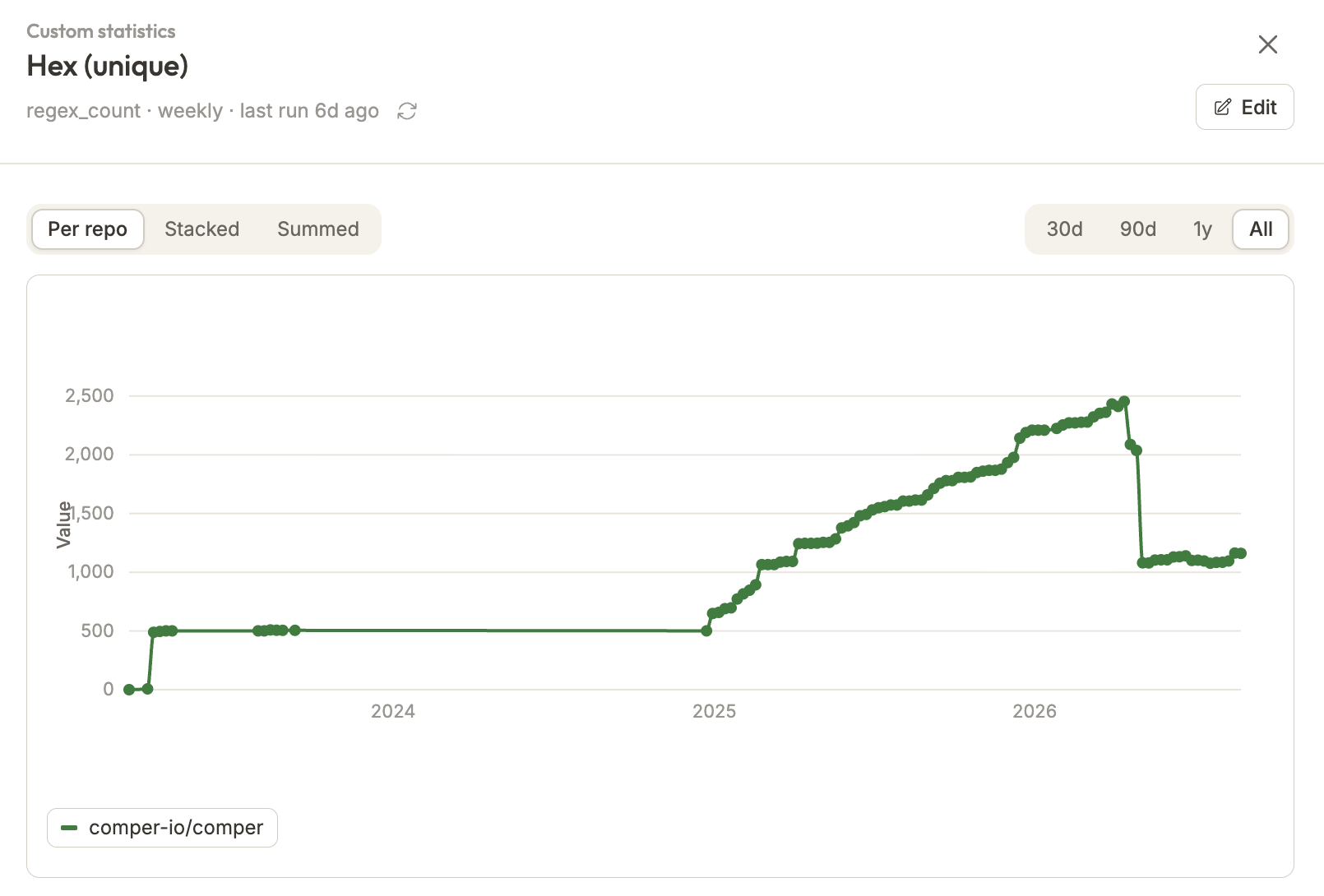
Although I personally like rainbows, I don’t like them in the front-end when unintentional. Many individual hex codes spread over your AI-generated code can be a symptom for several issues: Either you don’t have a design system in place, your CSS token set-up is brittle or you are lacking general agent instructions for selecting color when building new components.
Cleaning up our hex code sprawl with the aim to make our product look more coherent was a multi-step endeavour. After analysing and grouping existing colors, I reduced obvious duplications and refactored them from inside the components into the global main.css file. I then handed over my findings to our designer Doug who decided on more granular implementation details.
Product Feature
To analyze the scope of the duplication, we used our “Custom Stats” feature to track unique hexcodes. We expanded the previously total count metric to respect unique values, as we needed to track individual instances instead of occurrences. We also used it to track em vs rem units, important! usage and console.log noise.
Stabilising AI-generated Code
Your new co-worker, the Agent
If code wasn’t hitting the mark, you used to give feedback to the person who wrote it. Now you need to give it to the agent (too). Many inconsistencies in our front-end were grounded in the fact that we didn’t have any custom agent rules or skills in place. The majority of my first days at Comper were spent agreeing on Coding Guidelines and Ways of Working with my co-workers, which I then translated into agent rules and skills around how to write high-quality code.
Product Feature
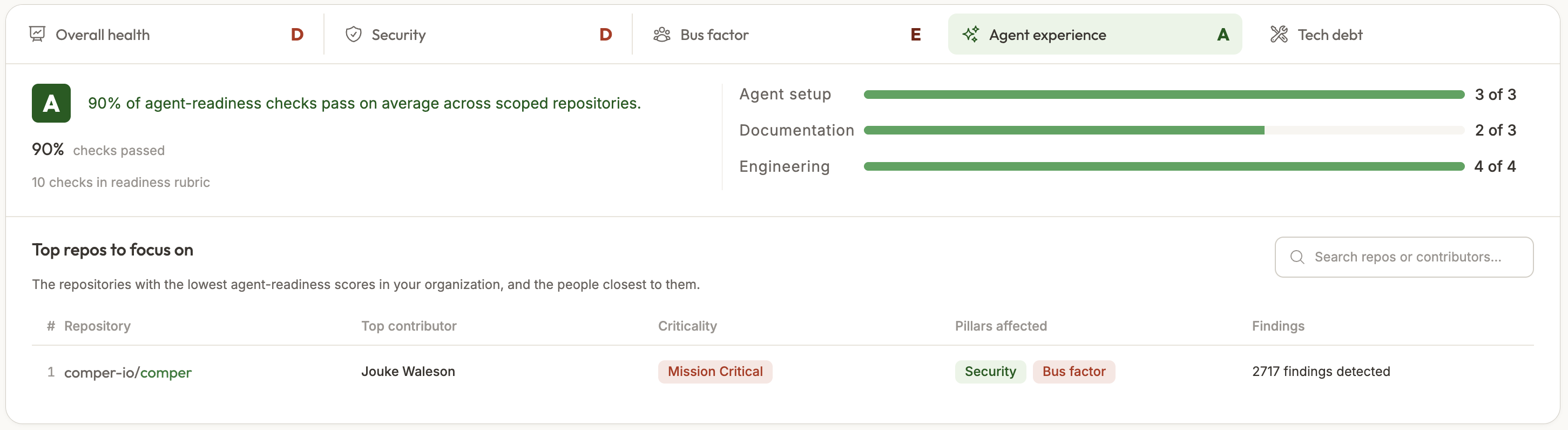
To give our users a quick overview of their set-up, we developed an “Agent Experience” score in our Dashboard view. This score measures if you have documentation in place, a solid CI/CD pipeline as well as local skills and rule files, and updates automatically as your codebase changes.
To test is best
Confidence in shipping large chunks of AI-generated code increases with solid test coverage hooked up with your CI/CD pipeline. Another great benefit: Once you have good test practices in place, your agent will adopt them and write tests for follow-up work.
When I joined the team, we had 0 front-end e2e tests and only a small set of unit tests in our codebase. I ramped up our test coverage by testing core product flows, which gave us more confidence when reviewing each other’s work before shipping. A failing CI/CD step is our strongest signal to not merge a MR.
Product Feature
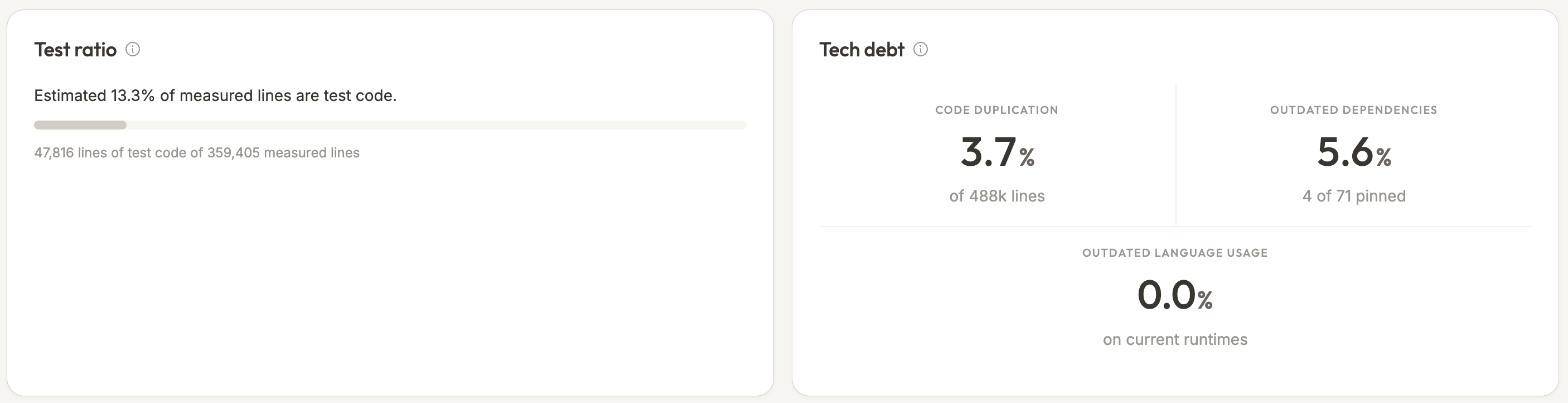
On our new Repository page, we’ve added insights which show you the test ratio (test files vs non-test files) of your coding landscape. It also features advanced insights into tech debt and vulnerabilities. Another place highlighting test coverage are our automated Code Summaries, which get attached to your MRs/PRs.
Owning AI-generated Code
After a couple of weeks which felt like a gold rush of peak productivity in our team, a core question formed itself: “If everyone produces code, who is in charge of reviewing it?” Who is responsible for making the final call for implementation, who assesses and owns the risks and who is bearing the grunt of work that comes after pushing your code - fixing CI/CD pipelines, failing tests or solving merge conflicts?
If your name is on the work, it is your work
At roughly the same time, Vincent Quigly over at Sanity published We don’t code anymore and says the following about ownership: “If your name is on the work, it is your work. Saying ‘AI helped with this’ does not lower the bar.”
And while our team is still discussing the best way to share the extended burden of code reviews across the Engineering team, we implemented solutions to reduce some upfront load.
Product Feature
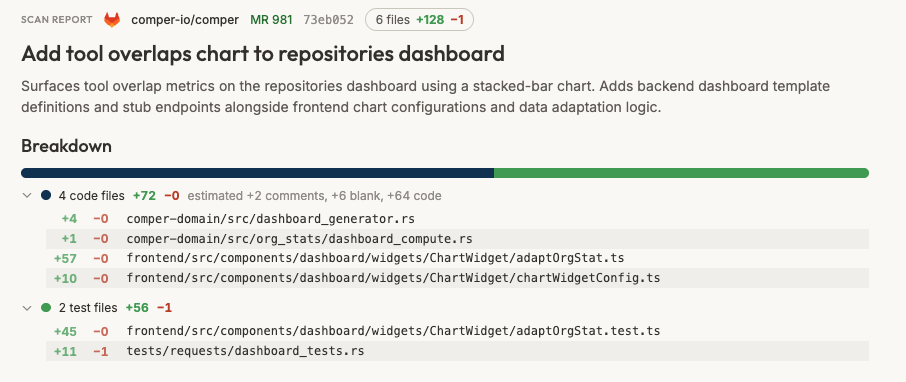
Our automated Code Summaries provide a high level overview of the changes submitted by your team members. They split the total lines of code into categories, highlight the code’s impact on existing features and propose a reviewer from your team who holds most knowledge about the area of change.
See it, stabilise it, own it
At Comper we think that true progress in building software does not come from speed, but from understanding.
Although we’re seeing a huge shift in how we write and ship code across all disciplines, the front-end domain is often the most accessible for non-Engineers who want to start making contributions. But in order to embrace new work-flows and the benefits of distributed impact with less Engineering involvement, guardrails have to be put in place. Comper helps you with analysing and stabilising your coding landscape with “AI Experience” scoring and custom stat trackers.
The influx of code created by non-technical stakeholders also requires more visibility across systems, up-front validation and facilitation of ownership. Our automated MR Scans help you with understanding the impact of code on existing features, increases readability by file categories and helps you find the right reviewer. And if you want to dig deeper, you can query our Comper agent which has your codebase’s context at its fingertips.
As a next step we are bringing Comper intelligence into your workflows by expanding our MCP, so that you can ingest your agent with insights which were collected and synthesized by our workflows combining the best of deterministic and AI-powered coding analytics.